CNN Classifier Toolkit
A config-driven, reproducible PyTorch toolkit for CNN image classification.
The toolkit turns a new image/label dataset into a trained, evaluated, and reported classifier through a typed YAML configuration. The same library powers the command line, so a quick smoke test and a full experiment use one pipeline. It ships with a complete reference implementation, five demos, and committed results from a measured Apple Silicon MPS run.
It is published on PyPI as cnn-classifier-toolkit; the import package remains
cnn_classifier and the CLI remains cnncls.
Results at a glance
| Experiment | Result | Budget |
|---|---|---|
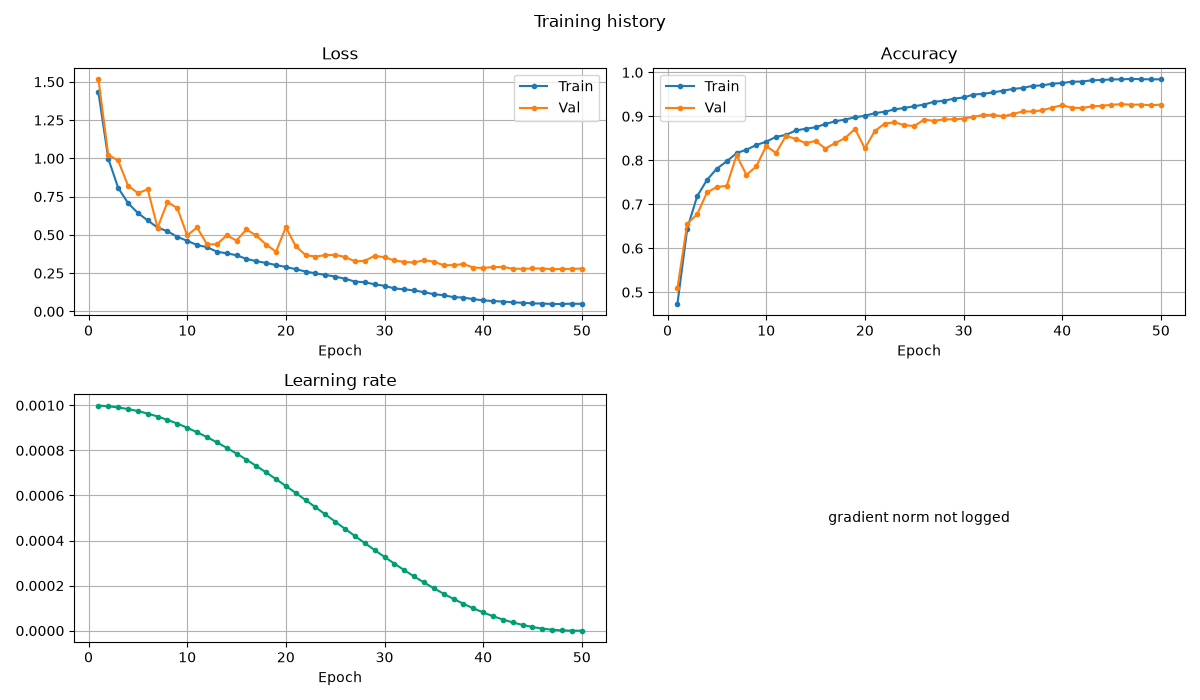
| CIFAR-10 scratch baseline | 92.25% test, 92.78% best validation | 50 epochs, 22.3 min MPS |
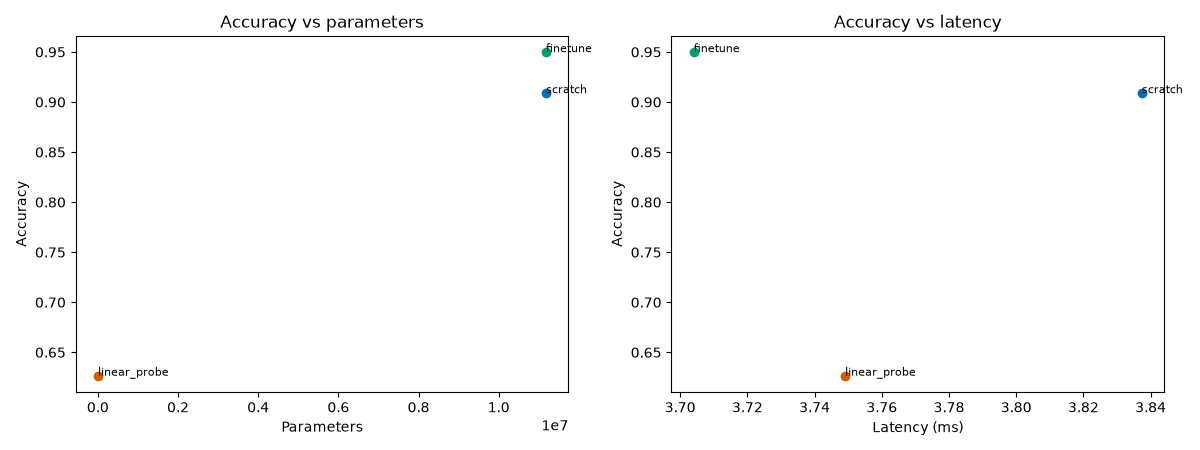
| ResNet-18 fine-tune, 32×32 | 94.98% test | 30 epochs, 19.5 min MPS |
| ResNet-18 scratch, 32×32 | 90.88% test | 30 epochs, 19.6 min MPS |
| ResNet-18 linear probe | 62.66% test | 30 epochs, 8.4 min MPS |
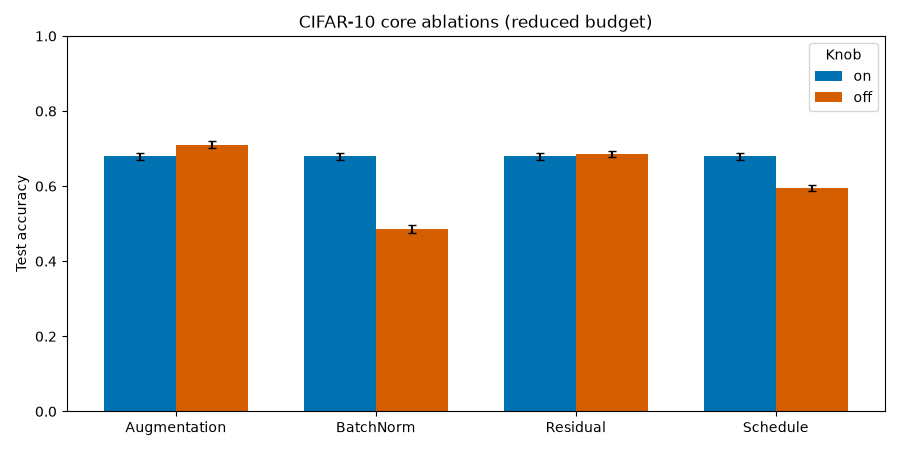
| Four core ablations | BN on +19.4 pp; cosine +8.5 pp; residual off +0.7 pp; augmentation off +3.1 pp | 8 epochs, 10k train subset |
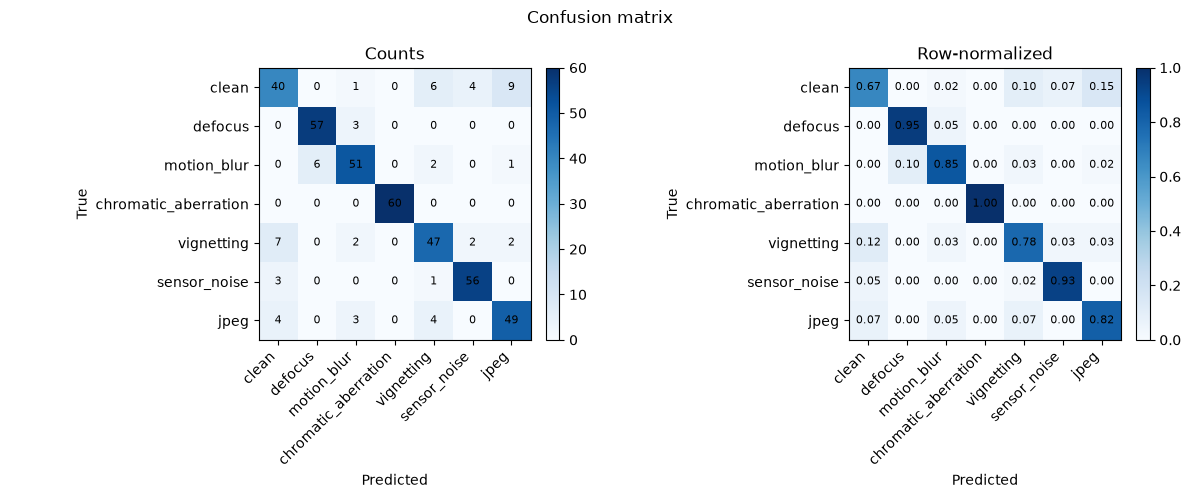
| Optical degradation classifier | 85.71% test | 20 epochs, 7.5 s MPS |
| Bring-your-own-data quickstart | contract verified | 2 epochs, under a minute |
Reference for the scratch baseline: 92.42% validation / 92.61% test on MPS, seed 42. The reproduced test result is within 0.4 percentage points and clears the ≥90% acceptance gate. See the CIFAR-10 case study for the environment and caveats.
-
CIFAR-10 baseline
A 7.8M-parameter residual CNN trained from scratch to 92.25% test accuracy.
-
Transfer benchmark
Scratch, linear probe, and fine-tune at 32×32; fine-tuning gains 4.1 pp over scratch.
-
Controlled ablations
Four paired experiments isolate augmentation, BatchNorm, residuals, and the learning-rate schedule.
-
Optical degradations
Seven synthetic degradation classes with a group-safe split and confusion analysis.
What it is
- One configuration contract. Every experiment is a validated YAML file. Unknown keys fail; CLI overrides use the same schema.
- One data contract. Adapters produce
float32 [C, H, W]samples, integer labels, and a written model contract. - One artifact contract. A run directory is self-describing: resolved config, environment, git state, fingerprints, checkpoints, metrics, predictions, figures, and a report.
- Test discipline. Training never iterates the test loader; test is available only through an explicit evaluation step.
Architecture
flowchart LR
    YAML[Typed YAML config] --> Data[Dataset adapters]
    Data --> Loader[Train / val / test loaders]
    Loader --> Model[Model registry]
    Model --> Trainer[Trainer + callbacks]
    Trainer --> Eval[Evaluation + diagnostics]
    Eval --> Report[Figures + HTML / Markdown report]
    Trainer --> Run[Self-describing run directory]
    Eval --> Run
    Report --> Run
The dependency rule is one-way: configuration and data do not import the training loop; training does not import plotting. Reporting reads run artifacts. See How it works for the module boundaries.
Quickstart
make sync
source .venv/bin/activate
cnncls doctor
cnncls train -c configs/tests/synthetic.yaml --set training.epochs=1
The synthetic run needs no download. For the real-data path:
python demos/bring_your_own_data/scripts/run_quickstart.py
python demos/cifar10/scripts/run_scratch.py --quick
Demos
| Demo | What it shows | Entry point |
|---|---|---|
| CIFAR-10 scratch | reference residual CNN and full training path | demos/cifar10/scripts/run_scratch.py |
| Transfer benchmark | scratch vs linear probe vs fine-tune at 32×32 | demos/cifar10/scripts/run_transfer.py |
| Ablations | four controlled pairs on a reduced CIFAR split | demos/ablations/run_ablations.py |
| Optical degradation | manifest data, group-safe splits, confusion analysis | demos/optics_degradation/scripts/run_optics.py |
| Bring your own data | raw-to-intake contract and custom adapters | demos/bring_your_own_data/scripts/run_quickstart.py |
Documentation map
- How it works — architecture, data and configuration, models, techniques, and extending.
- Demos — CIFAR-10, transfer, ablations, optical degradation, and bring-your-own-data.
- Reference — CLI and API.
- Quickstart — install, verify, run the first experiments.
Positioning
This is a modern, reproducible, well-diagnosed CNN training toolkit. It is not a state-of-the-art benchmark submission, a model zoo, or a notebook collection. The demos are chosen to exercise the engineering, not to win a leaderboard.