Bring your own data
The CNN Classifier Toolkit is designed so that a new image-classification dataset is a data adapter plus a YAML configuration, not a rewrite of the training loop. This page shows the contract with the committed quickstart fixture.
What you provide
A folder layout or a CSV manifest can describe the same data.
Folder layout
my_data/
├── train/
│   ├── class_a/*.png
│   ├── class_b/*.png
│   └── class_c/*.png
├── val/
│   └── ...
└── test/              # optional
Use data.adapter: image_folder and point data.root at my_data.
Manifest
path,label,split,group
train/class_a/sample_001.png,class_a,train,subject_01
train/class_b/sample_002.png,class_b,train,subject_02
val/class_a/sample_003.png,class_a,val,subject_03
Use data.adapter: manifest, data.manifest: manifest.csv, and
data.image_root: .. The group column is optional but lets inspection catch
leakage across splits.
Supported inputs
| Item | Supported |
|---|---|
| Bit depth | 8-bit RGB/grayscale; 16-bit grayscale PNG; 16-bit RGB/grayscale TIFF |
| Formats | PNG, TIFF, JPEG, BMP, WebP through Pillow/tifffile |
| Labels | folder names or manifest label |
| Split | folder names or manifest split; random, stratified, group, explicit |
| Class order | adapter order or data.class_names |
| Value range | automatic or fixed |
| Channels | rgb, gray, or as_is |
A 16-bit image is scaled from its full stored range to float32 in [0, 1];
it is not truncated to 8 bits. A 16-bit RGB PNG is rejected with a clear error
rather than silently downcast; use a 16-bit TIFF for multichannel 16-bit data.
The selected policy is recorded in the model contract and the report.
What the model receives
| Contract field | Meaning |
|---|---|
dtype |
Always float32 |
| one sample | [C, H, W] |
| one batch | [B, C, H, W] |
value_range |
[0.0, 1.0] after the configured scaling |
normalization |
mean/std, computed or supplied |
class_names |
ordered tuple used for the label map |
label_map |
class name → integer index |
channel_policy |
rgb, gray, or as_is |
stem_adaptation |
None here; may be set by a model config |
flowchart LR
    Files["Folders or manifest"] --> Adapter["manifest / image_folder adapter"]
    Adapter --> Bundle["DatasetBundle"]
    Bundle --> Sample["float32 sample [C, H, W]"]
    Sample --> Batch["Batch [B, C, H, W]"]
    Batch --> Model["Model"]
    Model --> Report["Report + model_contract.json"]
data/model_contract.json contains these fields, and both inspect-data and
train --dry-run print them before training.
Model design
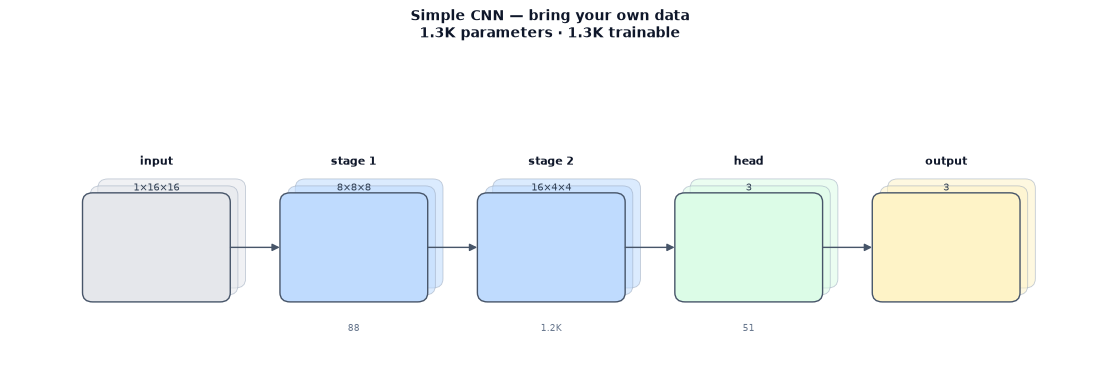
The fixture trains a small simple_cnn with 8/16 channels and 1,323
parameters. The schematic shows the grayscale input shape and the three-class
head; the exact contract is written to data/model_contract.json.
The quickstart fixture
The committed demo is demos/bring_your_own_data/:
- 3 classes:
circle,square,stripe; - 60 images: 20 per class, 15 train / 5 validation;
- 16×16, 16-bit grayscale PNGs;
- seed 7; manifest with
path,label,split,group; - two epochs, batch 8, CPU/MPS auto.
python demos/bring_your_own_data/scripts/run_quickstart.py
The run finishes in a few seconds and writes a self-contained report.html.
See demos/bring_your_own_data/README.md for the exact fixture layout and the
raw-to-intake comparison.
Quickstart result
The committed fixture reaches 60.00% validation accuracy (macro F1 50.46%) after two epochs, with 1,323 parameters and a training time of 0.26 s on MPS. This is a pipeline smoke check, not an accuracy benchmark; the point is that the raw-to-intake contract and the report path work end to end.
Custom adapters
A new format can be registered from a demo module without editing the library:
from cnn_classifier.core.types import DatasetBundle
from cnn_classifier.data.adapters import register_dataset


@register_dataset("my_format")
class MyFormatAdapter:
    @staticmethod
    def build(config) -> DatasetBundle:
        ...
Return the same DatasetBundle contract as the built-in adapters. The config,
trainer, evaluator, and report path then work unchanged.
Common mistakes
- Wrong class order.
data.class_namesmust match the adapter's index order; a mismatch fails loudly. - Wrong value range. If your files store 12-bit data left-aligned in
16 bits, use an explicit fixed range instead of
auto. - Leakage across splits. Put the source subject or scene in the
groupcolumn and use the group split policy. - Test-set use during training. The trainer never iterates the test loader; test is evaluated only through the explicit evaluate step.